
PIMWICK / OPERATIONS
PW Amelia Migration
Your bookings. Your next destination.
Move your Amelia booking data between WordPress sites. Export appointments, customers, employees, and more to a ZIP file you control.
- Export and import Amelia appointments, events, and related data.
- Move customers, services, and employees between sites.
- Keep downloadable ZIP backups under your control.
- Use source and destination roles with conflict handling.
- Works with Amelia Free or Pro, with or without WooCommerce.
PURPOSE BUILT. POSSIBILITY PACKED.
Less friction.
More forward.
PW Amelia Migration
Move customers, services, and employees between sites.
Keep downloadable ZIP backups under your control.
Use source and destination roles with conflict handling.
Works with Amelia Free or Pro, with or without WooCommerce.
Questions? We're right here.
Explore documentation or tell us what you want to achieve.
THE DETAILS MAKE THE DIFFERENCE
A closer look.
Every possibility.
Features, real screenshots, compatibility,
and the details worth knowing.

Migrate Amelia Bookings Plugin Data Between WordPress Sites
How to Backup and Restore Amelia Bookings
Take control of your Amelia Bookings data. With PW Amelia Migration, you can securely move appointments, customers, employees, and more between sites with ease. Whether you’re cloning a staging environment, switching domains, or consolidating bookings, our tool makes it simple.
From the creators of PW WooCommerce Gift Cards, trusted by thousands of WooCommerce shops, comes a powerful tool for site admins and developers.
Streamline Your Site Management with Easy Migration
Backing up or transferring booking data shouldn’t be a hassle. PW Amelia Migration simplifies the process:
- Export appointments, services, customers, and more in just a few clicks.
- Import data into a new site or restore from backup with confidence.
- Secure and private – your data stays in your hands.
- Great for developers, agencies, and site owners.
- 100% of Amelia Bookings data is included.
Save time and reduce errors by automating your Amelia Bookings data migration.
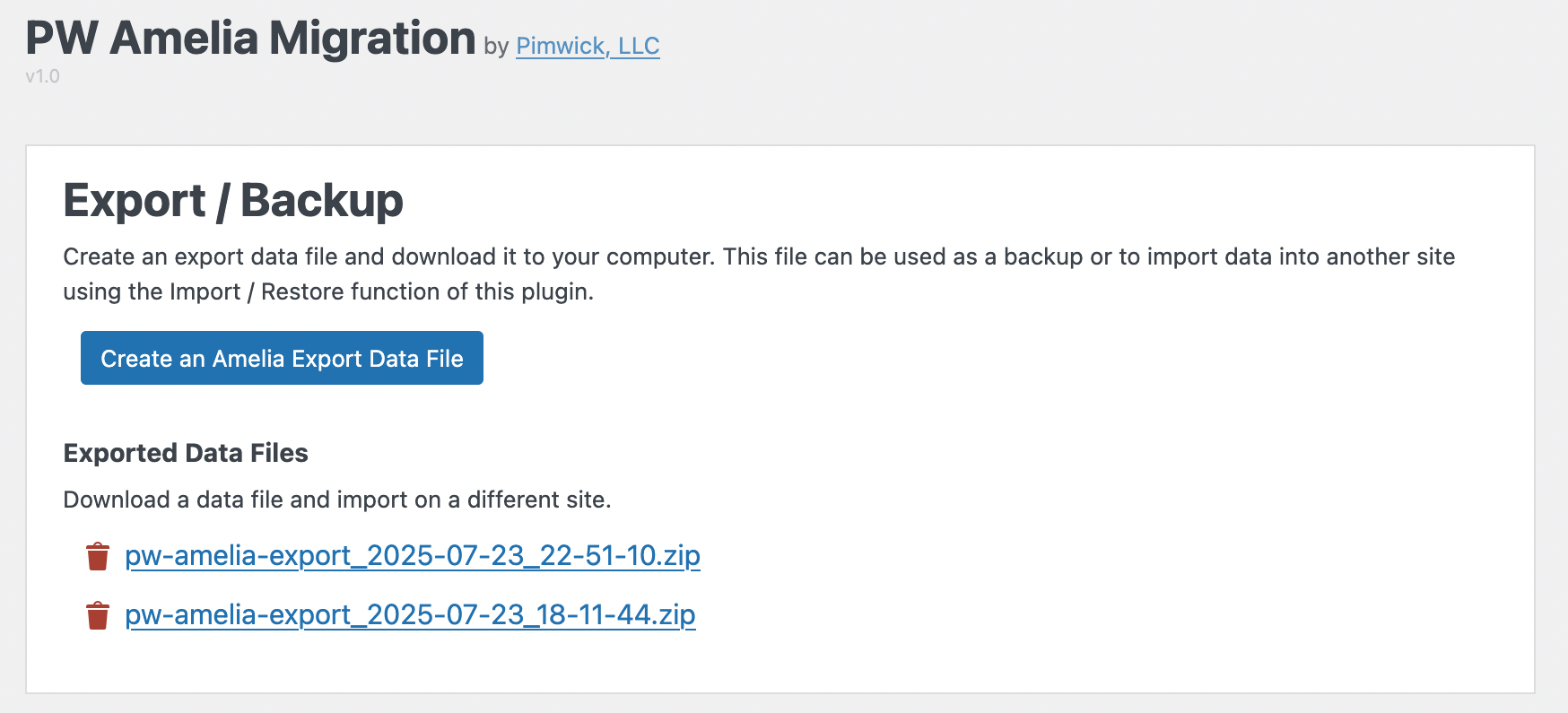
One-click Backups
Exports 100% of Amelia Bookings data including Calendar, Appointments, Events, Employees, WooCommerce Product Payments, and more.
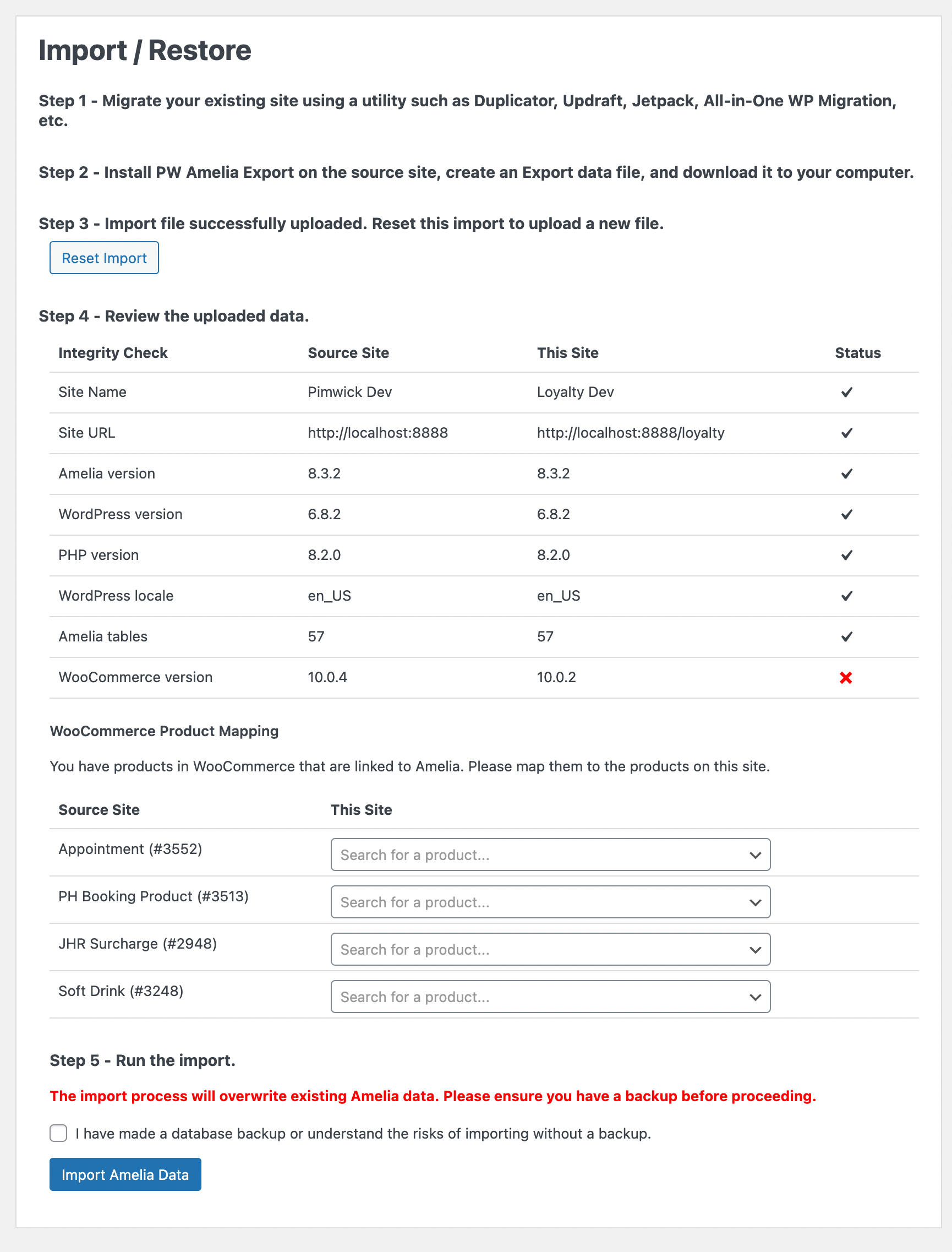
Streamlined Import
Migrate Amelia Bookings data between WordPress sites with just a few clicks.
Features
- Secure migration using downloadable ZIP files.
- Transfer appointments, customers, services, employees, and more.
- Supports both source and destination site roles.
- One-click export and simple import with smart conflict resolution.
- Works with the Free and Pro versions of Amelia.
- Optimized for WooCommerce and non-WooCommerce setups.
- No setup required – just install and migrate.
- Great for developers, agencies, or site owners managing staging and production.
Experts in WordPress Plugins Since 2016
We’ve been building high-quality WordPress tools for years, helping site owners manage data efficiently and reliably.
At Pimwick, we love making plugins that save you time. Whether you’re running one site or many, PW Amelia Migration gives you peace of mind.
Need help?
Contact us if you have any questions.